Instead of just explaining something to you, Naipes uses your answers and the way you reason to decide what you need next. It teaches step by step, makes you practise and stores what you understand in a knowledge graph that is still there in your next session.
Before we start, I want to know where you are starting from.
Prediction
A car covers 100 km in one hour. What do you know about its speed at 12:30?
It was doing 100 km/h
Nothing for sure: I only know the average
It was doing 50 km/h
I don’t know
Confidence50%
Your reasoningSubmit answer
DerivativesPlanning
Plan · from what you know to your goal
Differentiation rules goal
Derivative
Limit
Average speed
Slope of a line
Rate of change
Functions
You understand rate of change better than expected: the plan is redrawn.
DerivativesTeaching
f′(x) = limh→0f(x + h) − f(x)h
Check
If f(x) = x², what is its slope at x = 3?
3
6
9
Correct: f′(x) = 2x, so 2 · 3 = 6.
Search ideas…+0 ideas · Derivatives
DerivativeSlope of the tangent line: the limit of the rate of change. From the “Derivatives” session · today
ReviewTarget retention 90%
Due for review · 3 ideas
Limit 71%
Average speed 78%
Slope of a line 83%
Practise now
Next review: in 6 days.
Animated Naipes demo: you type what you want to learn (derivatives), the app measures what you already know with a prediction question, draws a plan from there to your goal and redraws it, teaches you with an explanation and a check, adds the new ideas to your knowledge graph and tells you when it is time to review them.
How it works
Four cards, in this order
Every session starts from what you already understand and takes you to your goal. If halfway through it turns out you understood more (or less) than expected, the plan changes.
11
Step 1: Measure
Before teaching, the agent finds out how far your understanding of each idea the lesson depends on goes. Your answers, your confidence and your reasoning tell it where to start.
22
Step 2: Plan
It draws a dependency map from that starting point to your goal. You can see the plan, and it is redrawn when your understanding turns out different from what was expected.
33
Step 3: Teach
Every step builds on something you already understand: you predict, get the explanation and check that you understood it. Confusions are repaired before anything is built on top.
44
Step 4: Practise
In separate sessions you get varied problems that make you recall the right idea without anyone naming it first. Problems and hints adapt to how you reason.
Knowledge that adds up
What you learn is not lost when the session ends
What you learn is stored as propositions and chains of reasoning: concrete claims and the premises that lead to them, linked to the session they came from.
Future sessions read that graph instead of starting from scratch, and practice sessions draw their material from it. It stores ideas and connections, not scores about your ability.
Your notes
What you have already written counts too
Naipes reads your notes folder and your documents, turns them into ideas in the same graph and keeps them up to date when they change.
Any notes folder
An Obsidian vault or a regular folder: the subfolders you pick feed the graph. Transcripts, practice sessions, concepts and summaries are written back to another folder, with standard Markdown links or with [[wikilinks]] if you use Obsidian.
PDFs, books and documents
It reads Markdown, plain text, PDF, Word and epub. Scanned pages go through local OCR if you have Tesseract, every idea remembers the page or chapter it came from, and long documents wait for your permission before spending.
An inbox for what is new
Drop whatever comes in into an inbox and Naipes suggests which folder to move it to based on how it connects to your graph, without calling the model. You decide, and moving notes, by hand too, does not repeat the extraction.
What it brings
Made for daily use
Your Claude Code subscription
Use the models in your subscription through the claude CLI installed on your computer, with no API key. If you prefer, there are more than 30 providers: OpenAI, Anthropic, Google, DeepSeek, OpenRouter…
Review against forgetting
Every idea in the graph has its own forgetting curve. Naipes tells you when it is time to review and prepares practice with what you are about to forget, to keep the retention you choose.
Exams with a deadline
Give it a syllabus, a date and the level you want to reach. A placement test sets your starting point and Naipes splits your daily minutes between reviewing, practising and learning what is missing, adapting to your answers and warning you if you will not make it.
Think out loud
Reasoning fields let you explain in your own words what you think and what you doubt, by typing or dictating. The agent sees how you think, not just whether you get it right.
A calm interface
Home, My sessions, Knowledge, Review and Exams on a single sheet. Light or dark theme, Spanish or English, the status of every session in sight and notifications when something finishes in the background.
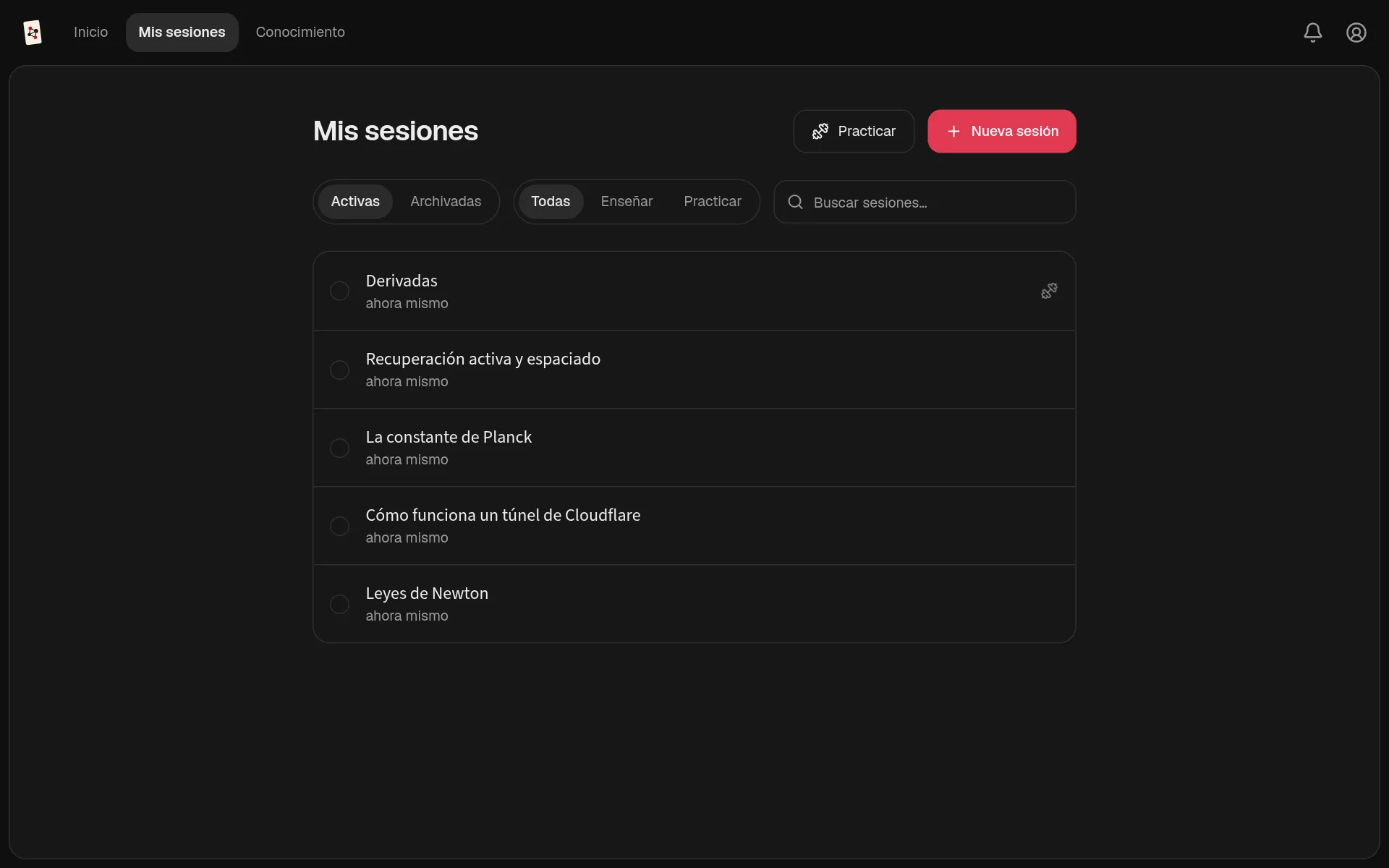
My sessions, in dark theme: at a glance you know where it is your turn to answer.
Privacy
Your keys, your data
Your keys, your models
No Naipes subscription and no fees. You pay your providers for what you use, and a live counter shows the cost.
Everything on your computer
Chats, graph, settings and keys are stored locally. Learning logs are plain text you can open and read.
No fine print
Models run on the providers you configure, and every request sends them the context they need. Storing locally is not processing offline.
Prompts in plain sight
System prompts are visible and editable. You can see what Naipes asks the model and change it.
Install
Try it on your computer
Naipes is a desktop app for macOS (Apple Silicon), Windows and Linux.
If you would rather build it yourself, on Linux the repository script builds it as an AppImage and installs it with its launcher and icon:
git clone https://github.com/alanahuel/naipes.git
cd naipes
bash scripts/install-linux.sh
Then open Settings, connect your Claude Code subscription or add your provider's API key, choose your models and start with whatever you want to understand. For development, pnpm install and pnpm run dev. All the details are in the README.
Credits and licence
Naipes builds on LearnHarness, created by Amos Blomqvist and its contributors; the git history keeps their work. On top of that base, Naipes adds the Claude Code connection, the knowledge folder (with or without Obsidian) with PDF, Word and epub reading, the inbox with suggestions, review with a forgetting curve, exams with a deadline, the Linux installer, its visual identity and the new interface.
It is distributed under the AGPL-3.0 licence, like the original.